Wednesday, September 20, 2017

ACRL-VWIG & ALA Virtual Communities in Libraries Program
July 16, 2017 12PM SLT   
 at the CVL Auditorium in Second Life

"Museums of Archaeology"
presented by: Severus Alexander


At the July ACRL-VWIG meeting,  Severus Alexander took us on a tour of an Archaeology Library and several museums on ancient archaeology and history.  The museums included monuments from Ancient Rome and beautiful buildings from ancient history.  Presentations on archaeology are included at the museum along with a Library of Ancient Greek and Roman Literature. The museum includes a gift shop! 

The SLurl is http://maps.secondlife.com/secondlife/Buttercup%20Isle/128/125/3001


All photos courtesy Valibrarian Gregg

Tuesday, September 19, 2017

ACRL-VWIG & ALA Virtual Communities Libraries Program
August 20, 2017 12PM SLT 
at the CVL Auditorium in Second Life

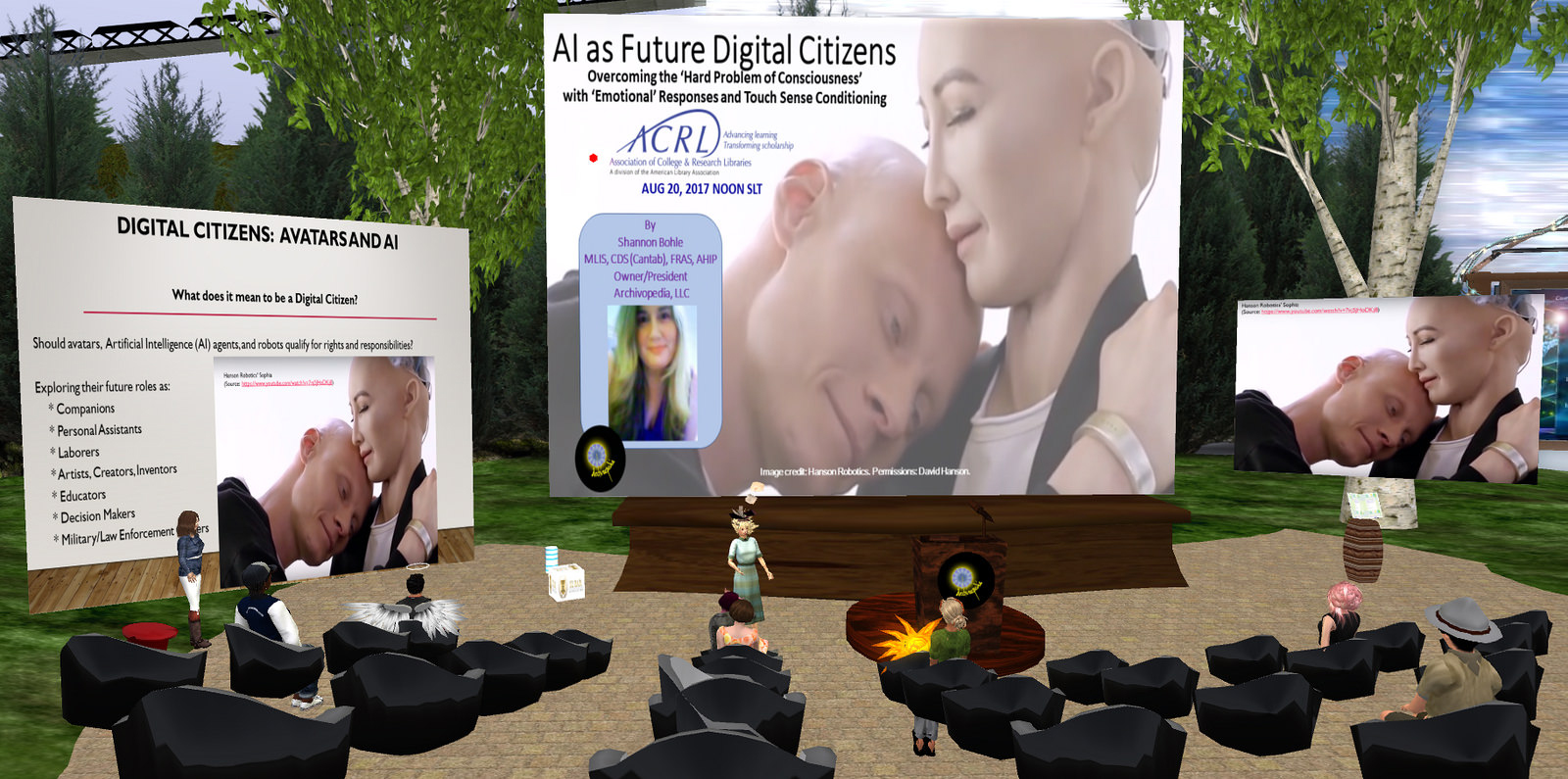
"Avatars and Artificial Intelligence: Future Digital Citizens"
presented by:
Starlight Darkmatter, Second Life Bar Association and  AI Robot Plutchik.


At this meeting Starlight Darkmatter from the Second Life Bar Association returned to share information about the rights and responsibilities of avatars. Participants were able to interact with AI robot, Plutchik. Plutchik is a work in progress – a bot in Second Life that can be trained to learn from an end user.  A useful response gets a swipe for “good” and a tap for “bad.”  Plutchik is named by Robert Plutchik who identifed eight primary emotions: anger, anticipation, disgust, fear, job, sadness, surprise, and trust.  With further development the Plutchik bot may be able to differentiate between emotions based on voice tone and stress.  To the extent that this happens can we say that bots have developed consciousness?  Can we teach bots to learn and apply ethical concepts? Will we learn to consider bots digital citizens?    Those of us at the meeting had an opportunity to ask Plutchik questions and get some responses.  
Photo by Dahlia Jayaram


Photos courtesy of Valibrarian Gregg


For the full transcript of the presentation click this link:
 https://drive.google.com/file/d/0B2pfovczopj8ejRUc1diaFJSbG8/view?usp=sharing


ACRL-VWIG & ALA Virtual Communities Libraries Program
September 17, 2017 12PM SLT   
 at the CVL Auditorium in Second Life

"Back to School in Cybalounge: A Follow-up Tour"
presented by:
Edward Tarber


All photos courtesy of Valibrarian Gregg


The ACRL group met in Cybalounge – a 3D virtual world that runs in a browser. No downloads necessary!  The world is easy to use and could be a trouble-free introduction to virtual worlds for new users.  Even though Cybalounge is still under development, Edward Tarber showed us some tools such as an interactive white board in the library.  Click on a book to read the contents of the book.  His students are already using Cybalounge to share classwork.  The number of avatars who can use CybaLounge at any one time is limited to the memory in the browser itself.  Probably 20 -25 avatars can share the space at any one time.  There are plans to allow for avatar customization and more!

 Links to videos of the discussion/presentation can be found in Youtube at the following URLS:
(All videos courtesy of Valibrarian Gregg)


https://youtu.be/UHwLbbxScL0

https://youtu.be/z63H4yrhwNc

https://youtu.be/oUW_HyYZwt4


To enter Cybalounge, simply go to https://cyba.world/location.html?locationid=800000004&dl=true Choose your avatar and name.

Register (for free) at https://cyba.world/ to gain some functionality not open to guests.  Click “register” and select an avatar user name and scroll down to select a password, provide your email address, accept the terms of service and send in your request.  You will receive confirmation via your email address.

Read more:   Tarber, Edward.  (2017, February 4).  cybaLOUNGE: A Virtual World in Your Browser. https://virtualoutworlding.blogspot.com/2017/01/2017-oshg-tech-cybalounge-virtual-world.html

Sunday, May 21, 2017

ACRL-VWIG & ALA Virtual Communities Libraries Program
May 21, 2017 12PM SLT 
at the CVL Auditorium in Second Life

"Vision of Virtual World Librarianship"
presented by:
Valerie Hill  (Valibrarian Gregg in Second Life),
President of the Community Virtual Library


At Mays' monthly meeting of the ACRL-VWIG, Valibrarian Gregg (Valerie Hill), presented an update on the activities of the Community Virtual Library (CVL), and shared information about some major changes that are coming to it.   The CVL has been active in Second Life and other virtual worlds for over a decade now!  During that time, it has always served as an information and networking hub for librarians and educators who were interested in the educational potential of virtual worlds.


This phrase has helped define the goal of all CVLs' activities during this time which has been, and continues to be, promoting virtual spaces for learning, resource-sharing and exploration.  This vision statement declares what the CVL intends to be; a place to share professional work, and communities as resources so that people can connect and learn in virtual environments.   Their mission statement further elaborates what they do: 


Ranganathan’s Five Laws of Library Science, which basically focus on the idea of connecting the learner to the resources they need readily translates and can be adapted to virtual world resources. Librarians in virtual worlds serve the same purpose too; helping to connect users with relevant information and resources.


Val briefly examined the principles which have guided CVLs' activities in virtual worlds for the last ten years.  These principles have been;

1.  Advocate Digital Citizenship-by understanding the changing needs of library users & learners in digital culture, the CVL strives to model digital citizenship for all age groups

2. Foster Connecting Virtual Communities-the CVL believes virtual communities are vital resources for digital citizens.  It has always focused its activities on fostering networking and forming of community partnerships as well as sharing communities of interest with visitors.

3.  Support Information Literacy- the CVL works to embed core values of librarianship in new media formats.  The emphasis has been on respect for intellectual property, fostering the information freedom rights of all users and emphasizing personal responsibility for digital citizenship.

4.  Adapt and Innovate-the CVL models adapting technology tools to meet the needs of learners through innovative formats in virtual spaces.  These tools include sharing virtual worlds, landmarks to immersive learning environments and collections of virtual learning communities as well as fostering the exploration of virtual reality.

These principles continue to guide the outstanding work of the Community Virtual Library.  


Val next announced some exciting news, the Community Virtual library is partnering with New Media Arts Online and in Virtual Worlds.  This nonprofit organization matches the purpose and philosophy of the CVL and matches its purpose and philosophy nicely.   The partnership will include moving CVLs' website to WWW.newmediaarts.org.   CVL will become a project within New Media Arts.

Val also announced the creation of a new branch of the Community Virtual Library within the virtual world Kitley.  This is step one in the effort to investigate ways to connect communities in virtual worlds beyond Second Life.

The CVL will hold workshops and events in Kitely and planning efforts are already underway for presenting a Digital Citizenship Program in the Fall of 2017 at the newly created Digital Citizenship Museum in Kitely.  The CVL will continue to host events and exhibitions in Second Life too.  The move to New Media Arts is seen as a way of connecting more virtual communities and provides "extra hands" to expand its' activities.  


The final announcement Val made was a new project which will be important to educators and librarians in virtual worlds,  the creation/development of a "Virtual World Database".  While there are numerous spreadsheets and lists of educational sims in virtual worlds, this project will provide a searchable database for finding them across virtual worlds. Creation of this database will highlight high quality content and libraries found in Second Life and other virtual worlds.  The goal is to provide a coordinated source for information about immersive environments and educational sims which demonstrate the educational/learning potential that virtual worlds encompass.  An invitation was made to those present to help create this database of virtual world communities and immersive learning spaces. The link is at:  https://goo.gl/forms/uezsNHEU8i3ivjdG3


As it has for the last ten years, the Community Virtual Library continues to strive to be inclusive and to support the work of others in virtual worlds.  It continues to shine the light on best practices in digital citizenship and learning in virtual spaces.

Wednesday, April 26, 2017

ACRL-VWIG & ALA Virtual Communities Libraries Program
April 9, 2017 12PM SLT 
at the CVL Auditorium in Second Life

"Avatars and Artificial Intelligence: Future Digital Citizens"
presented by:
Starlight Darkmatter, Second Life Bar Association
and
AI Robot Plutchik


For this program Starlight Darkmatter, Executive board member of the Second Life Bar Association and a virtual Artificial Intelligence Robot named Plutchik, explored the legal, ethical, and technical issues of AI development to examine what it means to be a "Digital Citizen".  In discussing whether avatars, artificial intelligence agents, robots, and androids qualify as Digital Citizens, and as such, whether we have any of the associated rights and responsibilities human Digital Citizens possess.

According to Plutchik, the characteristic which identifies a "Digital Citizen" is the evidence they leave behind them in electronic media.  Things like cookies left on computers, a browser history of sites visited, a record of our social media friends and connections. These "digital footprints" serve as evidence of one's actions.  And while many of these items are considered to be private activities,  they are used by companies to identify user behavior, likes and dislikes, and interests. 

Most current thought is that AI robots function more as tools and are programed by humans to perform certain tasks and explore their environments gathering data.  They are by definition not human.  They lack moral judgment, the ability to make moral choices, or to feel emotion or empathy.  "Their behavior is causally determined by human specification."

However, Plutchik made the case that AI robots, who also leave behind them these same electronic, digital footprints of their activies, should also be considered Digital Citizens.  He pointed out that AI robots are able to interact with people, and leave an impression on them.  They also leave behind the same digital footprints as humans who interact in a digital medium such as Second Life.  They leave evidence of their interaction in chatlogs.  They are able to interact with objects in a digital environment and with the perrson-driven avatars around them.

Plutchik suggested that in the future, an important paradigm shift will occur where “computers and digital actors” will no longer interact with humans as tools, but rather, will finally “be treated as social actors” with persuasive abilities.  This could shift things and result in the possibility that avatars and AI will become more fully accepted by humans as Digital Citizens.

Tuesday, April 25, 2017

Virtual World's Best Practices in Education Conference 2017


 CVL Presentations


 At the VWBPE Conference 2017, the Community Virtual Library shared two presentations.


First, a library and education role-play with a literature-based Medieval Quest was shared by Dr. Valerie Hill and Brant Knutzen (University of Hong Kong).

The Second presentation highlighted the Community Virtual Librarys' expansion into other virtual worlds by conducting tours to other vitural worlds.  A "Metaverse Librarians" team led a presentation on branching out to other worlds with Valerie Hill, Marie Vans, and Alyse Dunavant-Jones.  So far, the group has explored libraries in Kitely, Avacon, Inworldz, and a web-based virtual world called Cybalounge. Join the googlegroup "Metaverselibraries" for more information.  Be sure to join the SL group inworld called "Second Life Library 2.0" for notices about virtual world librarianship.


ACRL-VWIG & ALA Virtual Communities in Libraries Program
April 23, 2017  CVL Auditorium in Second Life 12:00pm SLT
"The TARDIS & Team Collaboration: Using SLACK to Manage Projects thru Space and Time"
presented by Halsted Bernard (Cygnoir Blanc in SL),
Circulation Divison Manager, Tigard Public Library, Tigard, Oregon


At this meeting, Cygnoir Blanc, a librarian with indepth experience with a wide variety of online collaboration tools, provided an overview of the basic features of the project management/collaboration tool, Slack.

 
Online collaboration makes use of many forms of communication; email; texting; Facebook groups; video-conferencing via FaceTime or Skype; Google Docs; Dropbox etc. All of these tools have a learning curve, may make it even more difficult to communicate and can make it harder to try and figure out which tool is the best one for the job.  SLACK is a tool that leverages the best aspects of all of them. 
      
Slack, a free, online project manager and collaborative tool.What is Slack?


 What is Slack?

Slack has been compared to a chatroom, but it's much more robust than that.  It's more like a digital workspace.  It incorporates in one place, many of the project management tools that teams separated by  time or distance use today.  Slack is accessible from any web browser. It also has desktop apps for Mac, Windows, and Linux.  More importantly, Slack is a FREE online tool with zero cost to set up for groups working on any project or interest. 
 

The Slack development team surveyed thousands of users in order to better understand its' collaborative benefits to teams and found 2 eye-opening statistics: on average, teams that use Slack have reduced their internal email by 48.6%. That’s nearly half of all emails sent internally. 
  
Teams that use Slack have 25.1% fewer meetings. Fewer emails and fewer meetings means more time saved!  


The Slack interface for Community Virtual Librarys.
To use it, the project manager sets up a "Slack team".  With a very intuitive design, the group activities are divided into channels and direct messages.  These are the 2 main means of communication in Slack.  The various channels are used to organize commuincation around topics or projects.   When a group member logs into the Slack site set up for their group,  they can communicate to all the other members in their particular group by chatting or uploading documents/graphics etc into the appropriate channel.  This allows everyone in the same group to see everything you've submitted, in one place.  Channels allow one to organize material for specific projects so that sub-groups don't have to go through materials that others are working on.  The conversational threads allows members to focus on just the part they need to see instead of having to weed through all the comments of all the sub-groups.


Slack also allows for direct, private messages between two members, or, can include up to 9 people a once should the team wish to hold a meeting to discuss some project. Direct messages work both in real time and asynchronously, like a message board.  This allows team members to communicate effectively with people across timezones and who are not in the same physical space.

Slack has an easy to use drop-and-drag interface.  This allows members to easily share images, PDFs, documents and spreadsheets in one place. without the need for separate logins to sites, and without the need to install multiple apps.  Slack allows group members to share files, add comments and have a fully collaborative shared workspace.  

There are mobile apps that allow you to "Slack on the go" with your iOS, Android, or Microsoft device. Anywhere you are, Slack can be. 
  
Slack can notify you about new activity in your channels and direct messages. Notifications are so robust that you can set them per channel and even per keyword. Or if you prefer not to be notified, you can turn them off entirely.

 
Following the presentation, Cygnoir led the group on a live demo, inviting attendee's to join and explore this very powerful tool for collaboration.